
AI workflow automation is transforming how businesses operate by handling repetitive tasks that once required human intervention. By leveraging technologies like machine learning and natural language processing, businesses can save time, reduce errors, and improve productivity. Here’s what you need to know:
AI automation is ideal for tasks like data entry, invoice processing, email triage, and HR admin. Start small by identifying bottlenecks, running pilot projects, and scaling based on measurable results. Companies across industries have already seen ROI within months, with savings in time, labour, and costs.
Want to get started? Focus on high-volume, repetitive tasks and ensure clean, centralised data for the best results.
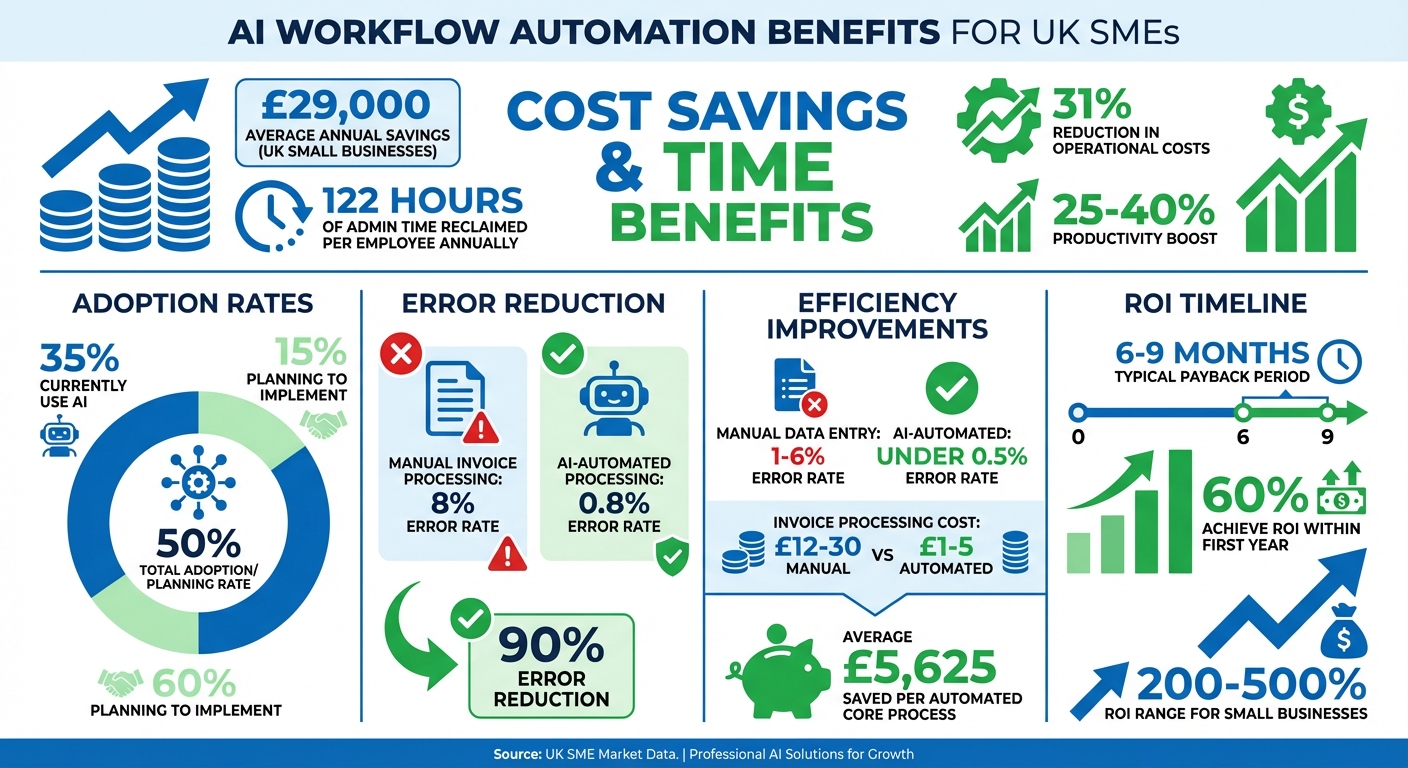
AI Workflow Automation ROI Statistics for UK SMEs
Before diving into AI implementation, it’s essential to pinpoint where your processes are faltering. Many SMEs make the mistake of automating too early, which can unintentionally accelerate inefficiencies rather than resolve them.
Start by creating a detailed task list. Take five minutes and jot down every repetitive task your team handles, no matter how small. This could include things like formatting documents, transcribing voice notes, chasing invoice approvals, or updating spreadsheets. Once you’ve got the list, score each task based on how often it occurs (e.g., 5 points for daily tasks, 2 for weekly tasks) and multiply this by the time spent. This simple exercise will help you identify tasks with the biggest impact on time and resources.
For instance, Cambridge Financial Associates, an accountancy firm, uncovered a significant bottleneck in their invoice processing. Their three-person team spent 25 hours weekly processing 500 invoices, with each invoice taking about 3 minutes. By integrating OCR technology with their accounting software, they slashed processing time to just 18 seconds per invoice - a time reduction of 89% - and cut their error rate from 8% to just 0.8%. This example shows how quantifying task durations can highlight where automation will deliver the most value.
Take the time to map out your workflows step by step, documenting every action, decision, and data transfer. This will help you uncover inefficiencies, such as emails languishing in inboxes for hours or inconsistent data categorisation due to unclear standards.
Research shows that UK workers spend about one full working day each week - 20% of their time - on routine administrative tasks. Much of this stems from disconnected systems that require manual data input and transfer between platforms. For example, if your sales team receives enquiries via email but then manually enters those details into your CRM, that’s a clear opportunity for automation.
Once you’ve mapped your processes, you’ll have a clearer picture of where automation can make the biggest difference.
Focus on tasks that are frequent, rule-based, and prone to human error. Manual data entry, for example, has an error rate of 1% to 6%, with approximately 88% of these mistakes caused by human oversight. These errors can lead to costly financial and operational consequences.
Take Stellantis & You UK, a car dealership group, as an example. They reviewed 47,000 customer messages over a year and found that 18,000 were routine enquiries with predictable patterns. By using AI to handle these messages, the company saved 151 hours of manual work and improved their Net Promoter Scores at the same time. This kind of targeted automation not only saves time but also enhances team productivity.
Look for processes where errors or delays have significant implications. For instance, manual invoice processing can cost UK businesses between £12 and £30 per invoice, while automation can reduce this cost to as little as £1 to £5. Similarly, approval processes often stall when reliant on manual sign-offs, whether via email or physical documents. TourRadar, a company with over 170 employees, solved this by automating leave management and document handling, saving 40 hours per week - the equivalent of one full-time employee.
For small businesses, every automated core process can save an average of £5,625 annually, with automation often cutting operational costs for specific processes by 20–40%. Start with tasks where AI can create a solid first draft - such as email responses, social media posts, or reports - that a human can quickly refine. Avoid jumping straight into automating complex decision-making tasks. identifying these opportunities lays the groundwork for a focused and effective AI strategy.
These examples highlight how UK SMEs are using AI to streamline operations, eliminate repetitive tasks, and focus their resources on growth. By addressing inefficiencies in key areas, AI is helping businesses achieve measurable improvements.
Marketing and sales teams often get bogged down by repetitive tasks. AI steps in here, handling these jobs quickly and efficiently. For example, AI lead scoring uses historical CRM data and behavioural patterns to boost MQL-to-SQL conversion rates by 34%.
The British Council leveraged AI-powered email tools to cut global enquiry response delays by 178% and increase open rates to 48.9%. Meanwhile, Neighborly used instant, AI-driven personalised follow-ups to recover 30% of missed leads, resulting in a 372% revenue increase.
Content creation also gets a boost. AI tools can take a single blog post and reformat it into social media snippets, email content, and LinkedIn threads, all while maintaining a consistent brand voice. This reduces production time by 40–50%.
Sales teams are seeing major benefits too. Lattice used AI to extract data from call recordings, creating tailored business cases that addressed specific client pain points. This approach increased late-stage win rates by 25% year-over-year. Similarly, Pynest co-founder Andrew Romanyuk implemented AI agents to analyse open-source company data, cutting lead qualification time by 32% and improving pipeline velocity by 22%.
Hyper-personalised outreach is now achievable for smaller businesses. Automation platforms can craft tailored opening lines for sales emails, referencing company news or tech details, which can increase response rates by 3–5 times. Considering that sales reps spend only 33% of their time actively selling, with the rest taken up by admin and follow-ups, automation can make a real difference.
AI is also transforming how HR teams operate. On average, HR professionals spend 14 hours a week on admin tasks that could be automated. Resume screening, for instance, takes about 23 hours per hire, but AI can cut this in half by ranking candidates based on skills and experience.
CCS Staffing implemented AI agents for candidate outreach, saving the company over £1.6 million annually. One HR leader shared:
"With Whippy's AI agents, our recruiters no longer waste hours chasing candidates. We've saved over £1.6M annually and can finally focus on building real relationships instead of managing inboxes".
AI also simplifies interview scheduling. Automated tools sync calendars, propose times, and handle rescheduling, cutting down the back-and-forth emails by 70% and reducing no-show rates by 25%.
Onboarding, a process involving over 50 tasks like account setup and training, can also benefit from automation. AI can save 10–12 hours per new hire in admin time. Once onboarded, employees can turn to AI chatbots for answers to routine questions about leave, benefits, or expenses, resolving 60% of queries without human involvement.
Performance management gets easier too. AI can automate review cycles, send reminders, gather peer feedback, and compile data for evaluations. This reduces the workload for HR teams, allowing them to focus on strategic goals.
AI is also making waves in finance, cutting down on manual work and reducing errors. Small business owners often spend 68% of their time on admin tasks rather than growing their businesses. Manual invoice processing, which has an error rate of 1.6% and costs about £53 per mistake to fix, is a prime candidate for automation. Cambridge Financial Associates reduced processing time by 89% and cut errors from 8% to 0.8% by integrating OCR technology with their accounting software.
AI agents can handle tasks like retrieving invoices from emails, extracting data with optical character recognition (OCR), validating it against business rules, and syncing it to accounting systems like QuickBooks or Xero.
Expense management is another time saver. AI tools can scan receipts, extract key details, auto-categorise expenses, and route them for approval. This reduces the time spent on expense reporting from 8 hours a week to just 30 minutes, with humans only needed for exceptions.
AI also improves financial reporting. Instead of spending 4–6 hours a week compiling data, AI can pull information from various sources to create real-time dashboards and automated reports on business performance. This not only saves time but also provides up-to-date insights for better decision-making.
For SMEs starting out with AI, focusing on a single repetitive task - like invoice processing or email triage - can quickly demonstrate the benefits. Ensuring clean, standardised data is crucial for AI to deliver accurate results.
Once you've pinpointed bottlenecks, you can use targeted automation pilots to show how AI boosts team efficiency. The good news? You don’t need to overhaul your entire system to get started. The trick is to start small, prove the value, and build from there. Here's how to begin implementing AI workflow automation without disrupting your operations.
Start by documenting your workflows - identify triggers, decision points, responsibilities, and outputs. Often, the best insights come from the people performing the tasks daily, not just managers. These frontline staff can highlight the real pain points and workarounds they encounter.
Focus on tasks that are high-volume, repetitive, rule-based, and prone to errors - these are the areas where automation can make the biggest difference. Pay close attention to rework loops, which are points in the process where tasks are sent back for corrections. On a process map, these appear as arrows circling back. Thick loops indicate frequent errors or missing data, making them prime candidates for automated checks.
Next, check your data infrastructure. AI systems thrive on clean, centralised, and easily accessible data. If your data is scattered across spreadsheets or locked in disconnected systems, you’ll need to address this first. As SwiftCase puts it:
"AI without structured processes produces chaos faster. An AI system layered onto broken, manual processes does not fix them. It amplifies their dysfunction."
To prioritise automation opportunities, use an Impact Matrix. This tool helps you evaluate tasks based on their business impact and the effort required to automate them. Start with "Quick Wins" - tasks that are both high-impact and easy to automate. Establish baseline metrics like processing times, error rates, and costs before automating. These will help you measure the return on investment (ROI) later.
With a clear understanding of your workflows and priorities, you’re ready to test automation through pilot projects.
Break down large processes into smaller, high-value tasks that can be automated for quick results. Look for tasks that can deliver measurable outcomes within 2 to 4 weeks for simpler tasks, or up to 90 days for more complex workflows.
To choose the right pilot, consider a weighted scoring model. Evaluate potential projects based on factors like Business Impact (40%), Technical Feasibility (30%), Frequency/Volume (20%), and Strategic Alignment (10%). For your first project, you might use a human-in-the-loop approach. This means AI handles context gathering or suggests actions, but a human makes the final decision - especially for high-risk or nuanced tasks.
Here’s an example: In 2025, Remote, a company with over 1,800 employees, used Zapier and ChatGPT to automate IT support workflows. Their system now handles 28% of monthly tickets automatically, saving over 600 hours each month. Similarly, Popl integrated OpenAI with HubSpot and Salesforce to automate lead triage and email enrichment, deploying over 100 AI workflows and saving $20,000 annually in operational costs.
Before committing fully, calculate potential returns using this formula:
(Time Saved × Hourly Rate × Frequency) - (Platform Costs + Setup Time).
This calculation gives you a clear financial target to aim for.
Once your pilot is live, monitor its performance closely and refine as needed.
AI workflows need regular monitoring to ensure they’re functioning as intended. Set confidence thresholds to determine when human review is necessary for lower-scoring tasks. During the first 2 to 4 weeks, run AI alongside manual processes to measure improvements and identify any edge cases before fully transitioning. For instance, tasks with confidence scores above 95% can be automated, while lower scores should trigger a human review.
Weekly check-ins with staff who interact with the system are crucial. Their feedback can help you identify any issues or exceptions, allowing you to refine prompts, rules, and handoffs.
Track key metrics to measure success:
For instance, Hero Bike implemented AI automation for customer support and became 150% more responsive to customer queries. This success came from careful monitoring and ongoing adjustments based on real-world performance data.
If you're an SME in the North West looking to integrate AI workflow automation effectively, Wingenious offers AI Strategy Development and Workflow Automation services to help you avoid common pitfalls and achieve faster results.
Once you've seen how AI can streamline operations, the next step is to measure its impact and scale your efforts. After initial pilot projects, it's important to show the value of automation by analysing baseline data and tracking tangible savings alongside less obvious benefits.
Start by calculating labour cost savings. Include salaries, benefits, and a 25–33% overhead. Use this formula to gauge annual savings:
(Hours Saved per Week) × (Hourly Cost) × (52 weeks).
For instance, in April 2025, a regional bank with 180 employees automated its new account onboarding using the n8n platform. With a Year 1 investment of £26,800, the bank gained £224,700 in annual benefits, including £121,300 in labour savings and £66,000 from avoiding 1.5 new hires. The result? A 739% ROI in Year 1 and a payback period of just 1.4 months.
Also, track error reduction using this formula:
(Errors per Month) × (Avg. Cost to Fix Error) × 12 × (Error Reduction %).
Automated workflows can cut error rates dramatically - from up to 75% with manual processes to under 0.5%. For example, in April 2025, an e-commerce company with £9.6 million in revenue automated its order fulfilment with Make.com. The £19,160 implementation cost led to annual benefits of £84,500, including an 83% drop in errors and 22 hours of weekly labour savings. This initiative delivered a 341% ROI in its first year.
Daniel Gertrudes, CEO of GrowthLab Financial Services, highlights a key point:
"AI cost ROI is more often about avoiding future costs than cutting current costs."
Between December 2023 and December 2025, GrowthLab implemented AI systems that reduced their accounting and tax staff from 25 to 18 while growing revenue. By December 2025, their accounting department's gross margin neared 55%, thanks to avoided hires and increased efficiency.
To maximise ROI, focus automations within specific roles or functions to avoid new hires instead of spreading automation thinly across the organisation. Always account for Total Cost of Ownership (TCO), which includes implementation labour, platform subscriptions, integration fees, and ongoing maintenance (typically 15–20% of initial costs).
Revisit ROI metrics quarterly to adjust KPIs and uncover new automation opportunities as AI tools evolve.
Once you've established clear ROI metrics, you can scale automation confidently. Use the success of pilot projects to guide your next steps. Start with straightforward, high-volume processes like invoice processing or lead routing or AI-powered customer support before tackling more complex workflows that span multiple departments.
Take Audi Japan as an example. In 2025, they automated their "Requests for Approval" process, cutting processing time by 75% and saving 60 hours of manual work per week. Similarly, BNP Paribas Cardif Japan sped up new release development by 1,680×, reducing the cycle from 4 weeks to just 10 minutes. This freed up 15 employees for more strategic tasks.
When scaling, prioritise creating capacity over simply cutting headcount. For example, Ynvolve, an IT equipment reseller, introduced an AI configuration agent that reduced quote creation time by 90%, saving €30,000 (around £24,000) monthly and forecasting 50% revenue growth without increasing staff. Meanwhile, Roamler, a data insights provider, used AI for image data extraction, avoiding 15 new hires and saving over €300,000 (around £240,000) annually while reducing error rates by 64%.
Jean Bonnenfant from Lleverage cautions:
"Most companies waste 30–40% of their AI investments because they're measuring the wrong things."
To avoid disjointed reporting, ensure IT, Finance, and Operations agree on how to define success early on. Businesses that take a comprehensive approach to measuring automation ROI often see returns up to 40% higher than those focusing solely on cost reduction.
The table below highlights the efficiency differences between manual and AI-automated workflows:
| Metric | Manual Workflow | AI-Automated Workflow |
|---|---|---|
| Processing Time | Minutes to days (e.g., 8 mins/email) | Seconds to hours (e.g., 30 secs/email) |
| Error Rate | 40–75% | Under 0.5% |
| Operational Cost | High; scales with headcount | 10–50% lower |
| Scalability | Limited by hiring/training | Instant and expansive |
| Employee Impact | High burnout from admin work | 89% report higher satisfaction |
| Data Accuracy | Prone to fatigue/oversight | Consistent; 49% fewer errors |
Most organisations see a payback period of 6–9 months for automation investments, with 60% achieving ROI within a year. Small businesses often achieve ROI in the 200–500% range.
For assistance in effectively measuring and scaling your AI automation efforts, Wingenious and its team of automation consultants offer AI Strategy Development and Process Optimisation services, tailored for SMEs in the North West. These services can help you establish baselines, track the right metrics, and scale automation strategically across your teams.
AI workflow automation brings clear advantages to SMEs: lighter workloads, improved accuracy, and significant time savings. Automating routine tasks like data entry, invoice processing, and lead routing can free up 15 to 20 hours each week, cut error rates and costs by impressive margins, shorten payment cycles from 45 days to just 22 days, and enable growth without the need for a proportional increase in staff.
To get started, focus on small, manageable steps. Use the insights shared earlier to pinpoint one to three key bottlenecks in your processes, then run a targeted pilot to track measurable results [58, 7]. Maintaining clean and accurate data is critical to avoid automation missteps, and it’s essential to ensure your chosen tools integrate smoothly with existing systems like your CRM or accounting software [58, 14]. These initial pilots can lay the groundwork for expanding AI adoption seamlessly across your business.
Nicole Replogle from Zapier puts it well:
"Real value shows up when AI starts taking the thinking parts of busywork and making them repeatable and fast."
Currently, only one in three UK SMEs are leveraging AI, leaving plenty of room for early adopters to gain an edge. With AI projected to boost the UK’s GDP by over 10% by 2030, now is the time to explore how these tools can be tailored to your business needs. The recommendations here bring together process analysis, pilot testing, and scaling strategies, all aimed at helping your business work smarter while growing efficiently.
If you’re an SME based in the North West and ready to take the leap, Wingenious provides services like AI Strategy Development, Use Case Identification, and Workflow Automation. These services are designed to align AI solutions with your specific goals while ensuring seamless integration into your existing workflows.
Automating tasks that consume significant time and streamline workflows is a smart starting point. Think about routine admin work - things like automating meeting notes, tracking action items, handling data entry, sending follow-up emails, scheduling, and processing documents. These repetitive tasks often take up valuable hours but don't require deep, creative thinking. By automating them, your team can shift their focus to more meaningful, high-impact activities. It's a win for productivity and morale.
To figure out the ROI for AI automation, weigh the benefits (like cost savings, increased productivity, and fewer errors) against the costs (such as setup expenses, licensing fees, and training). The formula is straightforward:
ROI = (Net Benefits – Total Costs) / Total Costs × 100%
You can also determine the payback period by dividing the total investment by the monthly savings. It's essential to monitor performance regularly to keep your ROI calculations accurate.
To get started with AI workflow automation, begin by collecting essential information about your current business processes. This includes pinpointing repetitive tasks and ensuring you have a dependable data source. Take the time to evaluate your existing data, map out workflows, and highlight tasks that are ideal for automation - think activities like data entry or sending notifications.
By analysing factors such as operational costs, error rates, and tasks that consume a lot of time, you can establish clear, measurable goals. This approach ensures that automation efforts are focused on delivering the best possible results.

Our mission is to empower businesses with cutting-edge AI technologies that enhance performance, streamline operations, and drive growth. We believe in the transformative potential of AI and are dedicated to making it accessible to businesses of all sizes, across all industries.


