
Deploying AI models can be a headache for SMEs. High cloud costs, data privacy concerns, and managing complex environments often make the process overwhelming. Professional AI consultancy can help navigate these hurdles. Docker offers a simpler, cost-effective way to run AI models locally, solving these challenges. Here's why:
For SMEs, Docker is a practical solution to deploy AI models without breaking the bank or compromising data security. Start small with AI feasibility studies to explore its potential.
Small and medium-sized enterprises (SMEs) often face a mix of technical and financial hurdles when deploying AI models. Recognising these challenges is a crucial step in identifying practical AI strategy solutions.
AI models that work seamlessly in development can break down in production due to differences in Python versions, library dependencies, or CUDA drivers. These mismatches, often referred to as configuration drift, can lead to errors and time-consuming troubleshooting.
Dependency management adds another layer of complexity. Strict version requirements and conflicts are common, and installing CUDA across different hardware setups can be a headache. This makes it difficult for teams to reproduce experiments or replicate results - an essential aspect for research and regulatory compliance. To put it into perspective, flawed software cost the U.S. economy an estimated £1.6 trillion in 2020. Fixing a defect early might cost around £75, but if left until production, that figure can skyrocket to £7,500.
These technical issues often intersect with resource limitations, creating further obstacles. Selecting the right AI tools is essential to overcoming these barriers.
Traditional virtual machines (VMs) require a full operating system for each instance, consuming significant resources and inflating costs. Without containerisation, a single application can hog CPU, memory, and disk space, potentially causing downtime for other systems. To avoid instability, SMEs frequently over-provision cloud resources, leading to unnecessary spending on unused capacity.
Interestingly, over 30% of organisations have already adopted containerisation as a way to increase efficiency and cut costs.
Setting up Python environments and configuring web servers can take a considerable amount of time. This challenge becomes even more pronounced when dealing with large AI models - some exceeding 2.31 GiB in size. Standard container image layers struggle to compress these high-entropy TAR archives effectively, consuming significant compute power with minimal size reduction.
"You don't need a GPU cluster or external API to build AI apps." – Vladimir Mikhalev, Senior DevOps Engineer and Docker Captain
In addition to setup delays, scaling AI systems poses another major challenge for SMEs.
SMEs often lack access to GPU clusters needed for high-throughput production environments, forcing them to choose between costly cloud services or slower local execution. Large models, which can consume several gigabytes, make it difficult to run multiple models simultaneously on limited hardware. Scaling AI to production-grade levels typically requires a cloud-native approach, a daunting task for SMEs with limited DevOps expertise.
These challenges highlight the need for solutions like Docker, which can simplify and streamline AI deployment for SMEs.
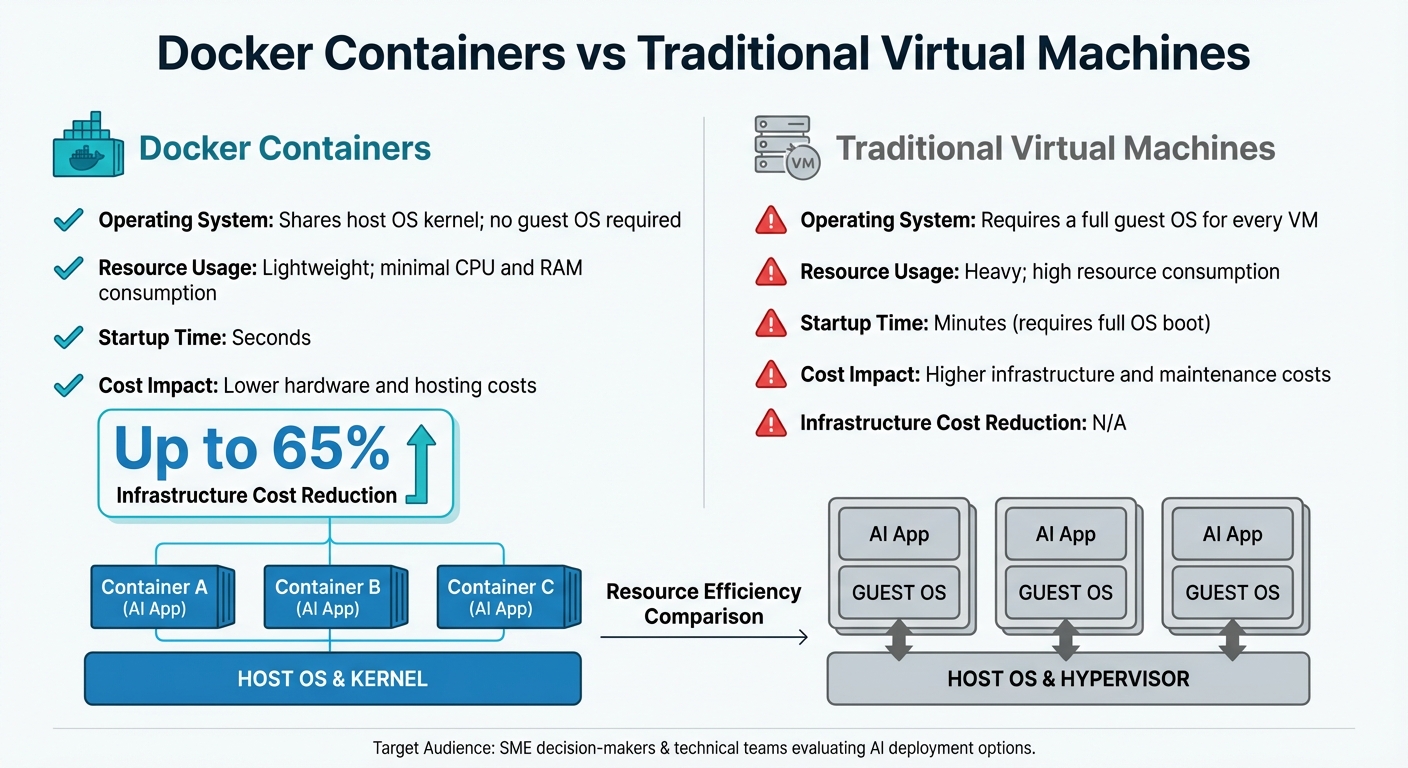
Docker Containers vs Traditional Virtual Machines for AI Deployment
Docker offers practical solutions to tackle the deployment challenges faced by SMEs, making AI implementation more accessible and efficient. By encapsulating AI models and their dependencies into containers, Docker removes many of the technical and financial hurdles that often hold smaller businesses back.
Docker simplifies AI deployment by packaging models as OCI (Open Container Initiative) artifacts, which include model weights, metadata, and configuration details. Using the Docker Model Runner, pre-built AI models can be deployed instantly without the hassle of manual setup. Each model artifact is identified by a unique manifest digest - a cryptographic hash that ensures the same version runs consistently across development, testing, and production environments.
"Docker Model Runner lets DevOps teams treat models like any other artifact - pulled, tagged, versioned, tested, and deployed." – Vladimir Mikhalev, Senior DevOps Engineer and Docker Captain
Docker also integrates seamlessly with Docker Compose, enabling teams to automate workflows by defining model dependencies and application services in a single compose.yml file. This makes it easy to deploy the entire stack across any platform that supports the Compose Specification.
Docker ensures consistent deployments, no matter the environment. By addressing the "it works on my machine" issue, it guarantees that applications behave the same way across development, testing, and production. Teams can avoid surprises by using specific version tags (e.g., :v1 or :2025-05) instead of the ambiguous latest tag. This practice helps track model versions and prevents untested updates from reaching production.
Additionally, Docker supports standardised inference engines like llama.cpp and vLLM, ensuring uniform execution environments regardless of the underlying hardware.
Docker provides a cost-effective alternative to traditional virtual machines (VMs). Unlike VMs, which require a full operating system for each instance, Docker containers share the host system's kernel. This drastically reduces CPU, RAM, and storage usage, enabling SMEs to run more applications on the same hardware.
Businesses using Docker have reported infrastructure cost reductions of up to 65%. By eliminating the need for multiple operating systems, companies save not only on hardware but also on licensing fees and the labour involved in maintaining separate VM environments.
Docker's ability to run AI models locally also helps SMEs sidestep the recurring costs and potential latency issues associated with cloud-based AI APIs.
"A software defect that might cost $100 to fix if found early in the development process can grow exponentially to $10,000 if discovered later in production." – Yiwen Xu, Docker
| Feature | Docker Containers | Traditional Virtual Machines |
|---|---|---|
| Operating System | Shares host OS kernel; no guest OS | Requires a full guest OS for every VM |
| Resource Usage | Lightweight; minimal CPU and RAM | Heavy; high resource consumption |
| Startup Time | Seconds | Minutes (requires full OS boot) |
| Cost Impact | Lower hardware and hosting costs | Higher infrastructure and maintenance costs |
Docker's ability to deliver consistent deployments at a lower cost has made it a game-changer for SMEs. Its strengths lie in speeding up processes, cutting down expenses, and enhancing security - all essential for businesses aiming to stay competitive through AI and automation.
Docker drastically reduces the time it takes to deploy AI models. With OCI-packaged models, tasks like pulling, tagging, versioning, and deploying become almost effortless, removing the need for tedious manual configuration of Python environments or web servers.
The Docker Model Runner simplifies integration by working with OpenAI-compatible APIs. This allows developers to connect AI models to existing applications with minimal coding effort. Additionally, for teams using Docker Compose (v2.35+), the system automatically handles model retrieval and injects connection details into dependent services, streamlining the deployment process.
For SMEs, Docker’s seamless integration with CI/CD pipelines is a major advantage. Tools like GitHub Actions can automate tasks such as pulling updated models, running security checks, and packaging updates. This automation ensures faster rollouts and prepares businesses for scaling up when demand spikes.
Scaling AI models with Docker is straightforward thanks to its lightweight design. By sharing the host operating system's kernel, containers allow multiple model instances to run on the same hardware without adding much resource overhead.
When traffic surges, additional container instances can be launched behind a load balancer. When demand decreases, scaling back is just as simple. Docker's modularity also means specific components, such as data ingestion or model serving, can be scaled independently.
In 2025, Retina.ai demonstrated Docker's scalability by achieving a threefold faster cluster spin-up time using custom Docker containers. This shift not only cut operational costs but also sped up machine learning workflows - an essential benefit for resource-conscious SMEs. Similarly, a fintech firm leveraging Docker Swarm and Kubernetes for AI-driven trading saw execution speeds improve by 40% and infrastructure costs drop by 30%, showcasing Docker's efficiency for budget-sensitive operations.
Docker’s container-based isolation offers strong security without the heavy resource demands of traditional virtual machines. Each container operates in its own environment, ensuring that if one AI model is compromised, it cannot affect other applications or the host system. Using Docker Hardened Images, which rely on distroless variants, organisations can reduce their attack surface by up to 95%.
By default, containers run as non-root, which means any breach remains contained, protecting the host system. For SMEs dealing with confidential data, Docker Model Runner allows local inference, ensuring that sensitive information and customer inputs stay on company hardware rather than being sent to external cloud APIs.
Docker also enhances supply chain security with features like Software Bill of Materials (SBOMs) and SLSA Build Level 3 provenance. These tools let teams verify the integrity and origin of every library and dependency within their AI containers. This level of transparency helps businesses catch security risks early and maintain compliance with regulatory standards.
Getting started with Docker for AI deployment is straightforward. Begin with a single model to explore its potential and prove its value.
To kick things off, activate Docker Model Runner in Docker Desktop by heading to Settings > AI, or install the docker-model-plugin for Docker Engine. This makes running AI models locally much simpler.
You can use the docker model pull command to grab a lightweight model from Docker Hub. For instance, downloading ai/smollm2:360M-Q4_K_M provides responsive performance even on basic hardware. Test it locally using the command docker model run [model-name] to see how Docker handles AI inference on a smaller scale before scaling up.
One handy feature of Docker Model Runner is its ability to automatically unload models from memory after five minutes of inactivity, which helps optimise resource usage. If you need to connect your AI models to OpenAI-compatible APIs, enable host-side TCP support with docker desktop enable model-runner --tcp 12434.
Once you've successfully tested a local deployment, you can start planning how Docker fits into your broader AI implementation strategy.
After your initial test, it's time to align Docker with your overall business objectives. Running a local model is only the first step. Look at areas where AI could make a difference - like automating customer support, analysing sales trends, or improving inventory management. Treat AI models as OCI (Open Container Initiative) artefacts, managing them just like container images by pulling, tagging, versioning, and pushing them.
Using Docker Compose to define models as part of your application stack ensures consistency across environments. This includes managing dependencies, configuration settings (like context size), and runtime parameters. Avoid using the latest tag for models, as it can lead to inconsistencies. Instead, adopt semantic versioning (e.g., :v1 or :2025-05) to keep your deployment pipeline predictable.
For small and medium-sized enterprises (SMEs) without in-house AI expertise, external guidance can be invaluable. Services like Wingenious.ai's AI Strategy Development can help identify practical AI use cases, prioritise projects, and create a roadmap that aligns AI adoption with your commercial goals.
Once your strategy is in place, it's essential to give your team the skills they need for a smooth implementation. Key areas to focus on include writing efficient Dockerfiles with multi-stage builds, orchestrating multi-service stacks using Docker Compose, and configuring GPU-backed inference for faster performance. Teams should also know how to integrate containerised models with applications using OpenAI-compatible APIs and AI SDKs like LangGraph or CrewAI.
Security training is just as important. Adopting shift-left security practices - like using Docker Scout for vulnerability scans and managing user namespaces to prevent root access issues - helps protect your infrastructure from the start. Make sure to use a .dockerignore file to keep local secrets, build artefacts, and version control directories out of your images.
Investing in AI Tools and Platforms Training can further prepare your team to deploy, monitor, and optimise Docker-based AI systems. With over 30% of organisations now using containerisation technology, building these skills early can give SMEs an edge without requiring full-time specialists.
Docker provides small and medium-sized businesses with a cost-effective and straightforward way to deploy AI models, bypassing the challenges and high costs of traditional methods. By reducing token fees, simplifying environment management, and ensuring reliable deployments, Docker removes many of the hurdles that can deter SMEs from embracing AI.
One standout feature is the ability to run models locally using Docker Model Runner, which keeps data on-site for improved privacy. On top of that, automatic resource management makes sure you’re not overloading or underutilising your hardware. With over 30% of organisations already adopting containerisation technology, getting ahead with Docker can give SMEs a crucial edge - without needing a dedicated team of specialists.
A practical starting point is to run a small test project to validate results before scaling up. As Vladimir Mikhalev, Senior DevOps Engineer and Docker Captain, aptly states:
"You're not just deploying containers - you're delivering intelligence".
Starting with a test project lays the foundation for a more strategic AI rollout. For businesses lacking in-house AI expertise, professional consultancy can fast-track the process. Services like Wingenious.ai's AI Strategy Development help identify actionable use cases, prioritise initiatives, and design a roadmap that ties AI adoption to business goals. Combined with AI Tools and Platforms Training, your team can gain the skills needed to confidently deploy, monitor, and refine Docker-based AI systems.
Deploying AI doesn’t have to be overwhelming or costly. With Docker, SMEs can start implementing intelligent solutions today while laying the groundwork for future growth.
You don’t always need a GPU to run AI models in Docker. That said, a GPU can make a big difference when it comes to speeding up tasks like training and inference. Docker works with a range of GPU options, including NVIDIA, AMD, Intel, and even integrated GPUs. It achieves this flexibility through APIs like Vulkan or Metal, allowing it to adapt to various hardware configurations.
To keep model versions consistent across different environments using Docker, start by packaging each model version into its own container image. Assign a version-specific tag to the image (e.g., my-model:v1.0) for easy identification. Push the tagged image to a container registry so it can be accessed later. Then, use the same tagged image in development, testing, and production environments. This approach guarantees a uniform setup, including environment settings, dependencies, and the model version, eliminating any inconsistencies during deployment.
For small and medium-sized enterprises (SMEs), ensuring the security of Docker-based AI deployments is critical. To achieve this, it's essential to implement strong protective measures such as:
Docker itself offers built-in tools to help with these efforts. Features like two-factor authentication, access tokens, and vulnerability scanning are excellent starting points to bolster security.
Beyond these tools, following best practices is key. These include:
AI-specific risks, such as prompt injection attacks, require extra attention. To mitigate these threats, configure your containerised servers with secure default settings, effectively reducing possible attack vectors. By combining these approaches, SMEs can create a more secure environment for their Docker-based AI operations.

Our mission is to empower businesses with cutting-edge AI technologies that enhance performance, streamline operations, and drive growth. We believe in the transformative potential of AI and are dedicated to making it accessible to businesses of all sizes, across all industries.


